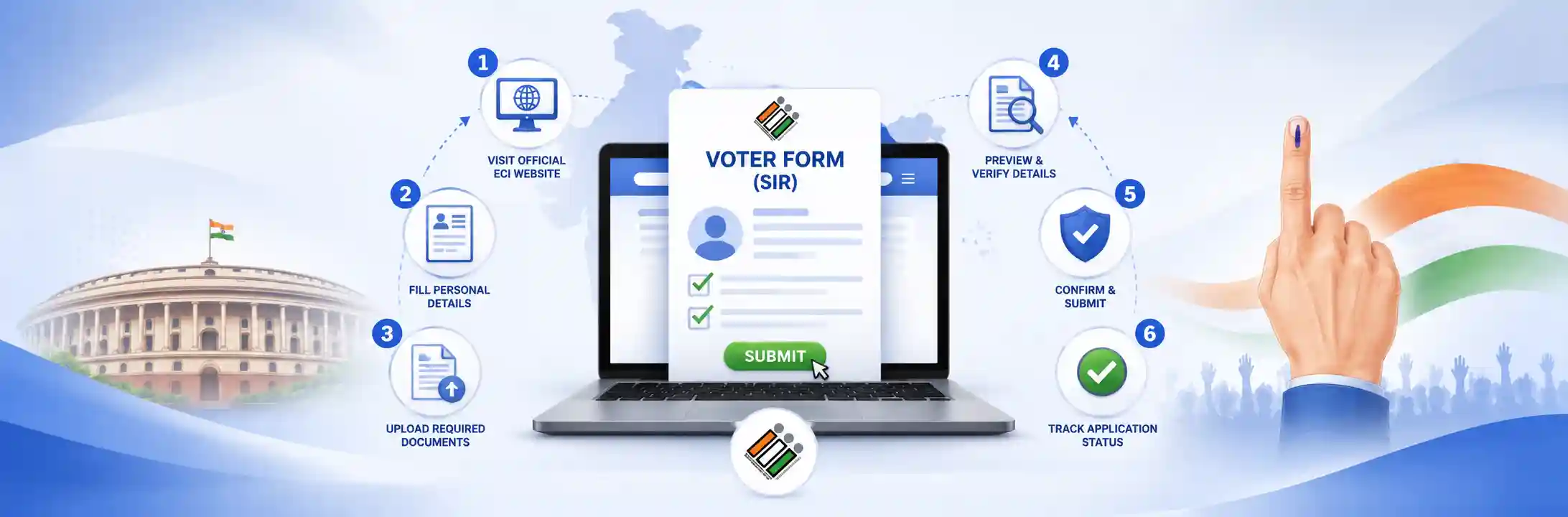
1. Overview of SIR & Essential Voter Forms
Special Summary Revision (SIR) voter forms include Form 6, Form 6B, Form 7, Form 8, and the SIR Verification Sheet, each designed for specific electoral roll updates like new voter registration, Aadhaar linkage, name deletion, or detail corrections. Selecting the correct form prevents administrative delays and rejection during field verification.
Form 6 (New Voter Registration): Primary application for first-time voters who have turned 18 years of age or eligible citizens who are currently unregistered in any constituency electoral roll.
Form 6B (Aadhaar Linkage): Used by existing registered voters to link their Aadhaar number with the electoral roll for identity verification and entry authentication.
Form 7 (Objection or Deletion): Designed for objecting to an inclusion or requesting the deletion of deceased, shifted, or duplicate voter entries from the roll.
Form 8 (Correction & Shifting): Applied for shifting of residence (within or outside constituency), correction of personal details (name, age, DOB, relative's name), or requesting a replacement duplicate EPIC card.
SIR Verification Sheet: Door-to-door household enumeration form issued directly by local Booth Level Officers (BLO) during intensive field verification drives.
2. Technical Prerequisites & Document Checklist
Applicants must prepare a valid proof of Date of Birth, proof of residence, and a passport-sized photograph in JPG, JPEG, or PDF format with a maximum file size of 2 MB before submitting ECI voter forms. Gathering these documents beforehand prevents browser session timeouts and upload errors on the ECI portal.
Mandatory Document List
- Proof of Date of Birth (DOB): Aadhaar Card, PAN Card, Class 10/12 Marksheet, Indian Passport, Birth Certificate, or Driving License.
- Proof of Residence: Utility Bill (Electricity, Water, or Gas bill less than 1 year old), Bank Passbook with photograph, Aadhaar Card, Indian Passport, or Registered Rent Agreement.
- Photograph: Recent passport-sized color photograph featuring a plain white background.
Technical File Formatting Standards
All scanned documents and photographs must adhere strictly to standard digital parameters: supported file formats are JPG, JPEG, or PDF, and the maximum file size limit is 2 MB per document.
3. Method A: How to Download Blank SIR Forms (Offline Submission)
Blank SIR voter forms can be downloaded directly from the official ECI portal (voters.eci.gov.in) by selecting the desired form PDF, printing it on A4 paper, and submitting the completed form to a local BLO or ERO office. Follow these four sequential steps for physical submissions:
Step 1: Access the Official ECI Portal
Open voters.eci.gov.in or eci.gov.in on any standard desktop or mobile web browser.
Step 2: Navigate to Forms Section
Click on "Forms" or "Download PDF Forms" from the top navigation bar and select your required application (Form 6, Form 6B, Form 7, or Form 8).
Step 3: Select Language and Print
Choose your preferred language (English, Hindi, or Regional Language), click Download PDF, and print the document cleanly on single-sided A4 paper.
Step 4: Fill Clear Details & Handover
Complete the form using a blue or black ballpoint pen in BLOCK LETTERS. Attach self-attested photocopies of identity proofs and handover the physical copy to your BLO during door-to-door verification drives or submit at the Tehsil / ERO Office.
4. Method B: Complete Step-by-Step Online Submission Process
Online voter registration on voters.eci.gov.in requires creating an account via mobile OTP, filling constituency and personal details, uploading supporting documents under 2 MB, and submitting the draft to generate a tracking Reference ID. Execute the process through the following five phases:
Step 1: User Registration & Portal Login
Go to voters.eci.gov.in. Click Sign Up, enter your 10-digit Mobile Number, optional Email ID, and CAPTCHA. Enter the OTP sent to your phone to activate your account. Click Login using your mobile number, password, and fresh OTP verification.
Step 2: Select Module or Form Type
For SIR Household Verification, click "SIR Verification / Enumeration Details" on the user dashboard and search using your EPIC Number (Voter ID). For new entries or corrections, directly select Form 6 or Form 8.
Step 3: Fill Application Sections
Select your State/UT, District, and Assembly Constituency (Vidhan Sabha). Type First Name and Surname in English; the portal automatically transliterates text into the regional language (e.g., Hindi). Verify regional spelling accuracy manually. Enter mobile number, complete OTP verification, input 12-digit Aadhaar number, and fill complete residential address details.
Step 4: Document Upload & Self-Declaration
Upload clear scanned files for Photograph, Age Proof, and Address Proof (under 2 MB each). Complete the statutory declaration regarding place of birth and duration of stay at current residence.
Step 5: Preview, Final Submit & Save Acknowledgement
Click "Preview and Submit" to review the populated PDF draft. Verify all spellings and document visibility. Click Submit and select Yes. Download and save the generated Acknowledgement Slip containing your unique Reference ID.
5. Alternative Mobile Method: Voter Helpline App
Citizens can apply for voter registration or correction on smartphones using the official Voter Helpline App by logging in with mobile OTP, scanning documents with the in-app camera, and submitting directly to receive a Reference ID. Here is the operational workflow:
- Download the official "Voter Helpline App" (ECI) from the Google Play Store or Apple App Store.
- Tap "Voter Registration" and select Form 6, Form 8, or SIR Verification.
- Log in via Mobile OTP, capture clear document photos using the in-app camera tool, and submit directly to receive your Reference ID.
6. Post-Submission Workflow & Status Tracking
After submitting an SIR form online, the application goes through BLO field verification, ERO administrative decision, and final Speed Post delivery of the updated Voter ID card. Understanding this 3-tier statutory verification procedure ensures smooth processing:
1. Track Status Online
Log into voters.eci.gov.in, click "Track Application Status", select your State, and enter your unique Reference ID from the acknowledgement slip.
2. BLO Field Visit
The assigned Booth Level Officer (BLO) performs physical door-to-door cross-verification or verifies your original physical documents.
3. ERO Approval Decision
The Electoral Registration Officer (ERO) reviews the BLO verification report and formally approves or rejects the electoral roll entry.
4. EPIC Printing & Dispatch
Upon ERO approval, an updated physical Voter ID (EPIC) card is printed and dispatched directly to your registered residential address free of charge via Speed Post.
Key Best Practices to Prevent Application Rejection
- Check Regional Transliteration: Always verify that auto-translated regional names (Hindi/Bengali/Tamil/etc.) match official documents exactly.
- Avoid Blurry Uploads: Scanned images must be crisp and readable; illegible text is the leading cause of BLO rejection.
- Exact Address Matching: Address line fields in the application form must match the attached proof (e.g., electricity bill or Aadhaar) line-by-line.
Frequently Asked Questions (FAQs)
How can I track the status of my online SIR voter application?
You can track your application status by logging into voters.eci.gov.in, clicking on 'Track Application Status', selecting your state, and entering the unique Reference ID provided on your submission acknowledgement slip.
What file formats and size limits are accepted for ECI document uploads?
The ECI portal accepts supporting documents and photos in JPG, JPEG, or PDF formats, with a maximum file size limit of 2 MB per document.
Which form is required to change address or correct name spellings on a Voter ID?
Form 8 is used for address changes, spelling corrections (name or date of birth), shifting of residence, or requesting a replacement duplicate EPIC card.
How does the BLO verification process work after online submission?
Once submitted online, a local Booth Level Officer (BLO) is assigned to perform physical door-to-door cross-verification or check your original supporting documents before submitting a field report to the Electoral Registration Officer (ERO).

Discussion 0
Join the Discussion
Login to your account to share comments, tips, and engage with other aspirants.